Reviewed 7 October 2026. Ledger amounts below are invented examples, not a member account.
In this guide
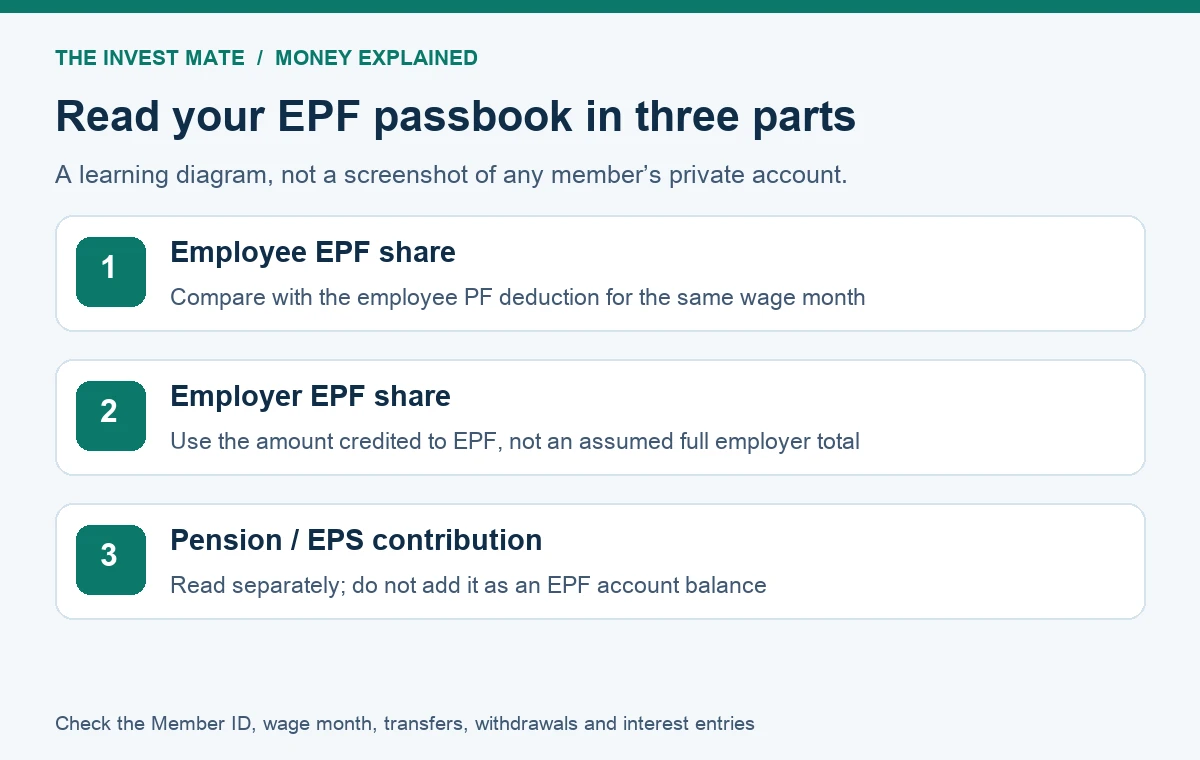
Your EPF passbook helps you check recorded contributions, but the employee share, employer EPF share and pension entry should not be treated as three identical savings balances. Start with the correct Member ID and wage month, then reconcile the recorded amounts with your payslip and employer's explanation.
- 1. Employee EPF contribution
Reconcile the employee deduction for the same wage month. - 2. Employer EPF credit
Use the actual EPF allocation, not the whole employer payment. - 3. Pension / EPS contribution
Read separately; do not count it as another EPF savings balance.
Where to access the official EPF passbook
The official EPFO Member Passbook page currently displays UAN, password and CAPTCHA fields. Sign in yourself on the official service and select the relevant employment record when available. This website does not need your UAN, password, Aadhaar or OTP to explain the statement.
EPFO's employee information booklet identifies passbook access through its official services and explains that employees of an exempted establishment may need the PF statement from the establishment. That booklet is older guidance; current screens can change. If the portal is unavailable, check official notices and the employer's statement rather than assuming that your money has disappeared.
Employee share, employer share and pension share
| Entry | What you are checking | Common mistake |
|---|---|---|
| Employee EPF share | Employee contribution recorded against the relevant wage period | Adding the same payslip deduction again |
| Employer EPF share | Employer amount actually credited to EPF | Assuming the entire employer payment is EPF |
| Pension / EPS entry | Contribution or service information associated with pension | Treating EPS as another EPF savings balance |
Use the actual reported allocation. Membership history and applicable scheme provisions can affect what is reported, so this guide does not assign a universal EPF/EPS split or calculate an individual's pension entitlement. A zero pension entry is a reason to check the record and applicable status; it does not by itself prove either a payroll mistake or that the employee is ineligible.
An illustrative monthly ledger
Suppose a learning example shows ₹2,400 in employee EPF, ₹900 in employer EPF and ₹1,500 in the pension column for one wage month. These arbitrary amounts demonstrate how to read columns; they are not a statutory allocation for a particular salary, age or joining date.
| Column | Example amount | How to use it |
|---|---|---|
| Employee EPF | ₹2,400 | Part of the illustrated EPF contribution |
| Employer EPF | ₹900 | Add to employee EPF for the EPF subtotal |
| Pension contribution | ₹1,500 | Read separately from EPF balance |
| EPF contribution subtotal | ₹3,300 | ₹2,400 + ₹900; not ₹4,800 |
In this example the EPF contribution subtotal is ₹3,300. The pension column is separate. A full account closing balance also involves earlier balances, interest, withdrawals, transfers and any adjustments; it is not simply one month's contribution multiplied by the number of months employed.
How to reconcile the passbook with your payslip
- Pick the right record: verify the employer and Member ID for the job you are checking.
- Match wage months: compare the wage period, not only the date an entry appears.
- Check employee deduction: compare the payslip employee PF line with the recorded employee contribution.
- Check employer allocation: obtain the employer's reported EPF and pension amounts.
- Identify special entries: separate arrears, adjustments, transfers and withdrawals from regular contributions.
- Record the difference: write the expected amount, shown amount, period and source document before raising a query.
For example, if a payslip employee PF deduction is ₹2,400 and the same wage month's recorded employee contribution is ₹2,160, the difference is ₹240. That observation identifies a question; it does not identify the cause. Ask payroll whether the record is complete and whether an adjustment, different wage period or corrected filing explains the difference.
Contribution missing or showing late: what to check
A missing line can require checking the filing, payment and posting status. Ask the employer to confirm the contribution's wage period and remittance details, and keep copies of the payslip and statement. There is no universal posting deadline established in this article. A temporary access problem and an absent contribution are different issues.
Use the support or grievance route linked from EPFO's official website if the discrepancy remains unresolved. Share relevant documents only through the official authenticated process. Before posting a screenshot publicly, remove identifiers, contact details, account information and unrelated balances.
Started your first PF-covered job? Contribution history can also matter for the PM-VBRY ₹15,000 benefit eligibility and payment checks. That guide separates the employment incentive from your existing PF balance and explains the prescribed course requirement.
Transfers, withdrawals and interest entries
After changing employment, compare both the old and current Member IDs and check the corresponding claim or transfer status. A transfer entry is not a new monthly salary deduction. An old record can remain relevant for explaining the movement of money and service; do not erase it from your own reconciliation worksheet.
Likewise, an interest entry and an employee contribution serve different purposes. Separate them when explaining growth in the balance. A withdrawal reduces the relevant recorded balance; a calculator that assumes uninterrupted accumulation will not reproduce a record with withdrawals unless those movements are included.
EPF claim and record problems: choose the right checklist
A claim-filing block, a rejected request and a settled claim without a matching bank credit are different problems. Start with the guide that matches your current status:
- PF transfer accepted but missing in the new passbook: compare the outgoing/incoming entries, destination member ID and Annexure K.
- DOE EPF not marked for one or more member IDs: compare the affected employment and supported exit record.
- EPF claim rejected: checks before reapplying: read the remark and verify the relevant correction.
- EPF claim settled but amount not credited: reconcile the claim, payment reference and bank statement.
Using an EPF calculator with passbook data
In our EPF projection calculator, use a verified opening EPF balance and the actual employer EPF credit. Do not add an entire employer payment when part belongs to pension. Future wage growth, rates and employment continuity are assumptions; the calculator is not an official account statement.
For the current coverage announcement and conditional deduction examples, read EPFO's ₹25,000 wage-ceiling explainer. For spending plans, use the budget planner with the cash salary actually received.
To see how the employee deduction and employer cost affect cash salary, use the CTC to in-hand salary calculator. Select the correct year, enter the actual monthly PF amounts from your payroll breakup and keep employer PF separate from the employee deduction. The tool compares ordinary salary tax and lets you download its assumptions; it does not verify the EPFO ledger or your statutory contribution basis.
Frequently asked questions
Can I add all three contribution columns to find my EPF balance?
Keep pension entries separate and use the statement's EPF balance after all relevant transactions. Adding only contribution columns misses other movements.
Why can the employer EPF share be smaller than my employee share?
The employer's reported payment may be allocated across components. Check the actual scheme allocation; a smaller EPF credit alone is not proof of an error.
What if my employer operates an exempted PF trust?
EPFO's employee booklet says an exempted establishment's passbook may not appear in the UAN portal. Request its PF statement and reconcile the relevant record.
Sources and scope
The official Member Passbook login page was checked on 7 October 2026. EPFO's older employee booklet supports the access and exempted-establishment explanation. Tables, amounts and reconciliation examples are original educational material. This guide does not determine scheme membership, pension entitlement or withdrawal eligibility.