Updated 21 October 2026. App steps are linked to official help. Interfaces and available actions can vary by app version, bank and mandate type.
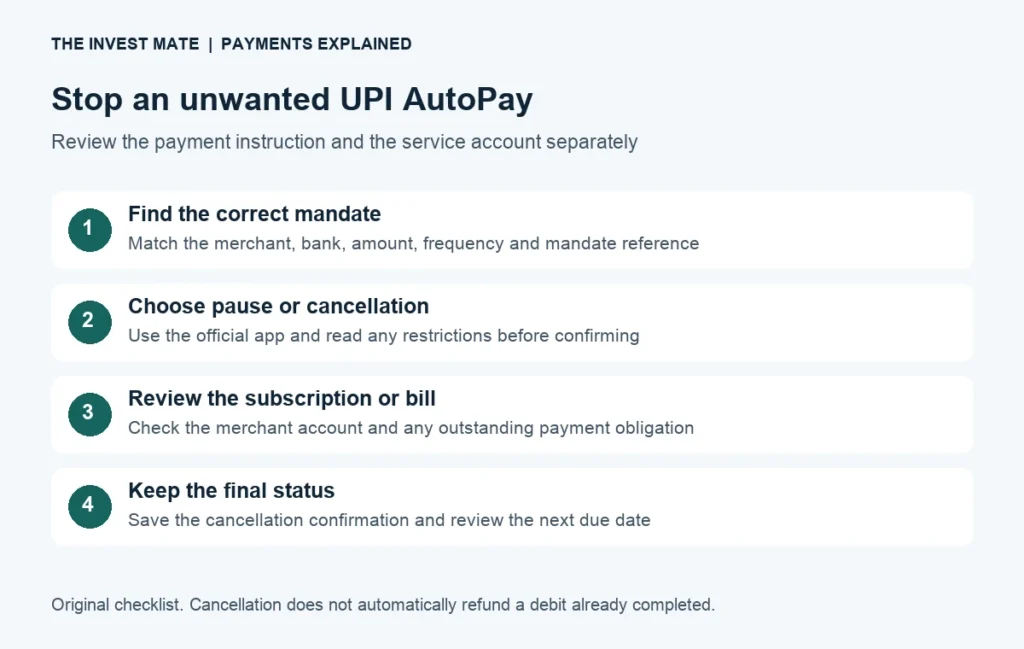
To stop an unwanted UPI AutoPay, find the exact mandate in the official payment app, choose the available pause or cancellation action and verify its final status. Also review the service or subscription in the merchant's account. Keep any earlier debit dispute separate.
AutoPay is a payment instruction. If the app you stopped using still has a recurring instruction, an unwanted deduction can be confusing. Start with the mandate's merchant, account and reference rather than guessing from a shortened bank-statement label.
How do I cancel UPI AutoPay through NPCI Help or my app?
If you want the NPCI website, use official NPCI UPI Help. If you know which app manages the mandate, go directly to that app’s mandate details. Match the merchant and reference before choosing an action.
Official portal access and mandate-management limits.
Read the portal checks →Profile → Autopay → select the live mandate.
Follow the GPay steps →Profile → Autopay Settings → identify the mandate.
Follow the PhonePe steps →UPI AutoPay कैसे बंद करें? पहले सही merchant और mandate पहचानें। Official app/portal में उपलब्ध pause या cancel/revoke option इस्तेमाल करें और final status जांचें। App हटाने या केवल कोशिश करने को cancellation confirmation न मानें। पहले कट चुके पैसे का refund अलग मुद्दा है।
Jump to: NPCI UPI Help · Google Pay steps · PhonePe steps · Cancellation errors · Subscription audit · FAQs.
Is the request for an IPO? Use our separate IPO UPI mandate troubleshooting guide for missing approval requests and blocked application funds.
What the NPCI UPI Help portal offers
The official NPCI UPI Help portal publicly lists mandate-management assistance, transaction-status checks and grievance redressal. It requires users to sign in themselves with a bank-linked mobile number and security verification.
Use the official domain and read the current instructions. Available mandates and actions may depend on support for the bank and service. A mandate not appearing in one view does not establish that it is cancelled. The signed-in workflow was not tested for this guide, so no universal “one click cancels every mandate” claim is made.
When you need help, keep the mandate reference, bank, merchant and error message ready for the official provider. Do not post your phone number, account information or security codes in website comments or send them to an unofficial “cancellation agent.”
My mandate is missing in UPI Help. What should I check?
Match the bank, merchant and mandate reference with your original payment app or provider’s record. An empty portal view is not a cancellation confirmation. Ask the official app or bank to confirm the instruction’s status and the supported route for that exact mandate. Keep its reply and reference; do not create a new mandate just to test whether the old one exists.
I changed apps, but the debit continues. What evidence helps?
Record the old mandate reference, current merchant, latest debit and any cancellation confirmation. Ask which provider now manages that instruction. Changing an app and cancelling the underlying instruction are different events; compare the documented status rather than the apps installed on the phone.
Pause, cancel, refund and subscription cancellation are different tasks
| Action | What to verify | What it does not prove |
|---|---|---|
| Pause a mandate | Effective start/end dates and paused status | That a service subscription or loan obligation ended |
| Cancel or revoke | Final status and the exact merchant/mandate reference | That a debit already made was refunded |
| Cancel a subscription with the merchant | Service-account confirmation and applicable terms | That the linked UPI mandate was also revoked |
| Dispute a debit | The individual transaction record and written complaint outcome | That every future mandate is now inactive |
Keep a short checklist with two separate questions: “What is the payment instruction's status?” and “What does the merchant account say about the service?” If only one has been checked, do not assume the other is complete. Read any outstanding invoice, contract or cancellation condition that applies to your account.
How to cancel or pause AutoPay in Google Pay
Google Pay's official recurring-payments help gives this route for a live mandate:
- Open Google Pay and tap your profile picture.
- Open Autopay, then the Live tab.
- Select the correct mandate and read its merchant and debit details.
- Choose Pause autopay or Cancel autopay. For a pause, check the selected date range.
- Complete the app's own authorisation and inspect the final status.
The help page describes UPI-PIN confirmation inside Google Pay. Never send that PIN to a person claiming to help you. It also states that loan mandates cannot be cancelled through Google Pay; contact the merchant for the applicable process. Its troubleshooting notes that the linked account must be active.
A screenshot of an attempted cancellation is useful evidence, but it is not the same as a completed cancellation. If an error appears, record it and check the final status before deciding that the next debit has been stopped.
How to find and manage AutoPay in PhonePe
PhonePe's official subscription-mandate safety guide points users to Profile → Autopay Settings to review and delete an unwanted mandate. It also describes pausing AutoPay. Use the current official in-app help if your version labels the menu differently.
- Open PhonePe and locate the AutoPay settings through the profile or current payment-management menu.
- Match the mandate to the merchant, bank and scheduled payment you want to review.
- Read the available pause or revoke/delete action, including any conditions.
- Complete the permitted action in the official app and keep the resulting status and reference.
PhonePe's AutoPay terms make clear that actions can be subject to merchant conditions and applicable rules. Certain mandate types require the action to originate from the merchant. Revocation timing can also depend on whether a redemption trigger has already begun. Do not assume every mandate can be cancelled in the same way or that a change reverses a payment already executed.
AutoPay cannot be cancelled: work through the specific reason
| Situation | Useful check |
|---|---|
| Loan-related mandate | Google Pay directs users to the merchant for cancellation details |
| Wrong merchant or account selected | Compare bank, reference, frequency and merchant name |
| Error or no final status | Keep the error and contact official app/bank support |
| An earlier debit is still disputed | Track that transaction separately from the future instruction |
| Mandate appears after an app change | Identify where it was created and use official bank/app assistance |
Write down what happened in order: the mandate you selected, action attempted, time, error text and status afterwards. This helps support distinguish an instruction problem from a transaction problem. If you changed apps or accounts, explain that too; do not invent a cancellation date that the provider never confirmed.
A short support message for a cancellation error
I am trying to [pause / revoke] mandate [reference] for merchant [name], linked to [bank]. The app shows [status] and returns [exact error] when I attempt [action]. The next displayed debit date is [date]. Please confirm which official cancellation route applies and whether the instruction remains active. Please provide a written status update and complaint reference.
Replace the brackets only in the official support channel. A loan or insurance-payment instruction may need a separate conversation with the provider about continuing obligations or an alternative payment arrangement. Stopping a payment method does not itself settle a debt or establish that insurance cover continues.
Money was already deducted: cancellation and refund need separate checks
List the affected debit separately from the recurring instruction. Record the transaction reference, date, amount, app status and the merchant's receipt. A successful subscription charge, a failed payment and an unfamiliar debit call for different next steps.
For a failed transaction, use our UPI money-debited refund and complaint guide. For a successful purchase you want refunded, check the merchant's policy and official refund process. Cancellation does not automatically make an earlier paid service refundable.
If a debit is genuinely unfamiliar or you suspect a scam, contact the bank immediately and report financial fraud through cybercrime.gov.in or 1930. These channels are listed by the Ministry of Home Affairs. Keep the original evidence and do not authorise another payment in exchange for a promised refund.
A simple recurring-payment audit
Make a private list of each merchant, monthly or annual charge, next renewal, mandate reference and whether you still want the service. Check both the payment app and merchant account. Include services you tried once and apps you no longer use.
| Service label | Monthly charge | Next action to consider |
|---|---|---|
| Subscription A | ₹499 | Check whether you still want the service |
| Subscription B | ₹199 | Review both the service renewal and mandate status |
| Subscription C | ₹99 | Keep or cancel deliberately after reading the terms |
| Total | ₹797 per month / ₹9,564 per year | A recurring-budget example, not a forecast of your savings |
In this imaginary example, keeping only A would remove ₹298 of future monthly charges from the list, or ₹3,576 over twelve months, if B and C are properly cancelled before future charges and their terms permit it. The arithmetic does not promise refunds for earlier payments or savings for your own accounts.
Annual plans need a different comparison. Divide an annual cost by twelve to compare budgets, but preserve its actual renewal date and cancellation terms. A ₹1,200 annual plan has a ₹100 monthly budget equivalent; it does not necessarily bill ₹100 each month.
The monthly budget planner can help organise the totals. Use confirmed future charges when updating the budget and retain receipts for any separate refund. If the instruction pays a loan or card bill, keep meeting actual obligations and review our credit-report and payment-planning guide.
UPI AutoPay questions
Will deleting an app stop AutoPay?
Verify and revoke the actual mandate through an official supported route. Deleting an app is not evidence that the bank instruction or merchant service was cancelled. Check the status rather than relying on the absence of the app.
Can I pause it instead of cancelling?
Both linked providers describe pause options, subject to the mandate's available actions. Check the effective dates and whether it resumes later. A temporary pause and a final cancellation serve different purposes.
Will stopping AutoPay refund my last deduction?
Not automatically. Review the individual debit and the applicable refund or dispute route. Preserve both the instruction's final status and the transaction's complaint reference.
Should I leave the account empty to stop a debit?
Use a confirmed instruction change and resolve any actual bill with the provider. An insufficient-balance attempt is not a cancellation confirmation, and obligations can remain. Ask about an alternative payment arrangement where needed.
Why is a loan mandate different?
Google Pay's help specifically directs loan-mandate cancellation questions to the merchant. Follow that route and obtain written instructions; the cancellation menu for a streaming subscription does not establish the procedure for a loan.
Do I need to share a UPI PIN with support?
No. Keep authorisation inside the official app when its legitimate workflow requires it. Never disclose the PIN, OTP or password to a caller, chat agent or public comment.
Google Pay help, PhonePe guidance/terms and the public NPCI portal checked on 21 October 2026. The earlier guide was reviewed on 11 October. This independently written educational guide is not affiliated with NPCI, Google Pay or PhonePe. It does not log in to your accounts, cancel mandates for you or promise a refund.