Reviewed 17 October 2026. Your EPF claim says “settled”, but the bank statement has no matching credit. Start by separating the claim decision from the payment trail: which claim was settled, for what amount, when the payment was released and to which account?
Quick answer: save the claim’s settled amount and date, check the destination bank details and a current account statement, then obtain the payment reference and trace its outcome with EPFO/the bank. Do not assume a passbook debit proves that the money reached your bank, or submit another withdrawal request simply because the credit is missing. A universal “three days after settled” promise is not established by the sources used here.
“Claim settled” and “money credited” answer different questions
Treat the status as a prompt to investigate the payment evidence, not as a complete bank reconciliation. A claim record describes the request; a payment reference helps trace the transfer; your bank statement records the credit received. Check the actual data rather than infer that one screen proves every later step.
| What you see | What it helps establish | What it does not establish by itself |
|---|---|---|
| Claim status: settled | Which claim has reached a settlement status | That the intended bank account has received a matching credit. |
| Approved/settled amount | The amount to reconcile for this claim | That all requested amounts or other claims were paid together. |
| Passbook adjustment | An entry in the EPF account record | A matching credit in a bank statement. |
| Payment/UTR reference, if supplied | An identifier the bank can use to investigate a transfer | The outcome without a bank trace or credit confirmation. |
| Bank statement credit | The amount and date actually posted to that bank account | The status of a separate claim or service record. |
If your claim is not settled and instead says rejected, use our EPF rejection guide. If you could not submit the claim because of an exit-record message, use the DOE EPF/member-ID guide. These situations need different evidence.
What to check when a settled EPF amount is not credited
- Match the claim. Note its reference, type, affected employment and settled amount. Keep a separate line for each request.
- Record the dates separately. Submission, settlement, payment release and bank credit are different fields. Ask about any missing one.
- Check the destination account. Compare the bank details relevant to the payment with your own records. An old account or an account you no longer use needs investigation.
- Download a current statement. Search the relevant period and amount, not only SMS alerts or an app notification.
- Obtain the payment reference. If the portal does not show it, ask EPFO for the transfer mode, release date and reference.
- Trace the outcome. Give the bank the reference and relevant transfer details through an official secure channel.
- Preserve the reply. If the payment was returned or not released, ask EPFO what verification and reissue process applies.
RBI’s NEFT FAQ says tracing can use the UTR/transaction reference together with details such as date, amount and bank information. That supports a payment-tracing request; it does not make the EPFO status-change time the starting point of every NEFT obligation. RBI: NEFT frequently asked questions.
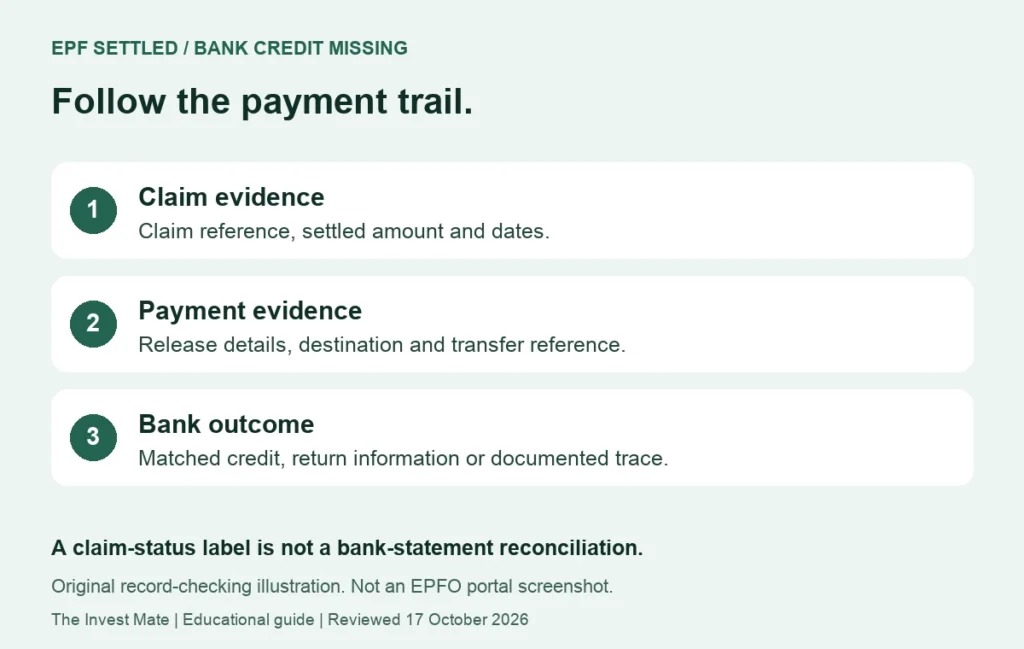
Reference, settled amount and relevant dates.
Release details, destination and transfer reference.
Matched credit, returned payment or documented trace.
Example: two claims do not have to arrive as one credit
The following numbers are invented only to illustrate reconciliation. They are not eligibility calculations, real payments, promises about timing, or a statement of tax treatment. Suppose your worksheet has two separately referenced claims:
| Item | Amount in this illustration | What the statement shows |
|---|---|---|
| Claim A settled amount | ₹48,000 | One matching ₹48,000 credit. |
| Claim B settled amount | ₹12,000 | No matching credit in the statement checked. |
| Combined amount to reconcile | ₹60,000 | ₹48,000 matched; ₹12,000 still needs investigation. |
₹48,000 + ₹12,000 = ₹60,000, and ₹60,000 − ₹48,000 = ₹12,000 unmatched. The missing ₹12,000 is not proof of an error or entitlement to compensation. It tells you which separate payment trail to ask about. Do not say “nothing was paid” if one claim has a matching credit; identify the unpaid/unmatched claim precisely.
If your statement has several credits of the same amount, use dates, narration and an official bank trace instead of matching on amount alone. Where the credited amount differs from the claim record, request a calculation/payment breakup; do not guess that the difference is tax, a fee or a missing pension contribution.
Should you contact EPFO or the bank first?
| Situation | Useful question | Where to start |
|---|---|---|
| No release date or payment reference | Was payment released? What mode, date, destination and reference were used? | EPFO, using the claim reference. |
| Payment reference supplied, no matching credit | Can you trace this transfer and confirm credited, pending investigation or returned status? | Your bank’s official service channel. |
| Bank says payment returned | What is the return reason/reference, and what must EPFO verify before reissue? | Retain the bank reply; ask EPFO about the correction/reissue process. |
| Wrong or inactive destination suspected | Which account was used for this particular payment, and how should it be reconciled? | EPFO and the relevant bank; do not assume a new KYC entry changes an earlier transfer. |
| More than one claim | What is the outcome for each reference and amount? | Keep and query each record separately. |
Updating bank KYC and resolving an already-issued payment are different tasks. The April 2025 official release simplified bank-account seeding after verification, but a newly visible account entry is not evidence that an earlier payment was automatically rerouted. PIB: bank seeding and online-claim changes, 3 April 2025.
How long should you wait after “settled”?
Use any timeline actually stated in your own official acknowledgement or response, and ask for clarification if it has passed. Screenshots from another member and a generic blog estimate do not establish a deadline for your payment. An auto-settlement announcement also should not be read as a guarantee that every claim and every bank credit finish at the same speed.
You can organise a useful enquiry as soon as you identify missing evidence. A reference that EPFO has not supplied is a question for EPFO; a documented transfer without a matching credit is a specific bank-tracing question. Avoid repeatedly creating new claims or changing unrelated records while the payment trail remains unclear.
For a documented EPFO service issue, EPFiGMS: official grievance service provides registration, status and reminder facilities. Retain the registration reference and earlier answer so a follow-up can address what is still missing. Ask for factual payment information rather than assume that a generic grievance automatically qualifies for compensation.
A payment-tracing message you can adapt
Subject: Settled EPF claim — payment trace requested
Claim reference [reference] shows settled on [date] for [amount]. I checked the relevant bank statement through [date] and cannot identify the matching credit. Please confirm the payment-release date, mode, destination account details through this secure channel, transaction/UTR reference and current outcome. If payment was returned or not released, please state the reason and the verification/reissue steps required. Relevant status and statement evidence is attached.
Send the bank the transfer reference and relevant details only through its official channel. Keep passwords and OTPs private. If sharing screenshots outside an official secure service, remove identifiers and unrelated transactions. We do not collect your EPFO documents or trace private payments from this website.
Keep EPF passbook and bank-statement checks separate
Our EPF passbook guide explains the contribution columns. Use it for account-record understanding; it is not proof that every pension or contribution entry will be paid to your bank as part of the same claim. The EPF projection calculator is a planning model, not an official claim-payment tracker.
Frequently asked questions
Does “settled” guarantee the money is already in my bank?
Check the bank statement and payment evidence. The claim status alone does not complete the reconciliation.
Why did I receive only one amount after filing two requests?
Compare each claim reference and payment outcome separately. One credit is not proof that every related request was paid.
Should I file a new withdrawal claim for the missing credit?
First establish the outcome of the settled request. Ask EPFO about a returned or unreleased payment rather than creating a duplicate blindly.
What if the portal does not show a UTR?
Ask EPFO for the transfer mode, release date and reference. Do not invent a reference from a different number on the page.
Will updating bank KYC automatically bring the old payment?
Do not assume that. Establish where the earlier payment went and what correction/reissue procedure applies.
Can this guide promise a three-day credit or compensation?
No. It provides an evidence and follow-up workflow, not an account-specific deadline or entitlement decision.
Sources and review scope
Official references checked on 17 October 2026. Earlier source dates are shown so a process announcement is not presented as a new October 2026 rule. Portal wording and the route available to an individual member can vary.
- RBI: NEFT frequently asked questions
- PIB: bank seeding and online-claim changes, 3 April 2025
- EPFiGMS: official grievance service
The examples, checklists and message templates are original educational illustrations. We have not accessed your EPFO account or tested an authenticated claim on your behalf. This page does not determine your benefit eligibility or promise an approval or payment date.