Updated 21 October 2026. “Claim filing cannot proceed as DOE EPF is not marked for one or more member IDs linked to the Aadhaar set of the member” is an exit-record error. Repeating the claim without identifying the affected employment record may leave the same block in place.
Quick answer: DOE means date of exit. Check the employment/member IDs associated with your records, identify a genuinely missing or incorrect exit entry, and use the correction option available to your account or ask the relevant employer/EPFO office to verify it. Do not enter a false leaving date for a job you still hold, or delete a genuine employment record just to clear the message.
DOE EPF not marked का मतलब और क्या करें — हिंदी में
DOE यानी Date of Exit: नौकरी छोड़ने की दर्ज तारीख। इस error का मतलब है कि आपके आधार से जुड़े एक या अधिक employment records में EPF exit की जानकारी पूरी नहीं मिल रही है। यह संदेश अपने-आप यह नहीं बताता कि कौन-सा Member ID प्रभावित है।
- पुरानी और वर्तमान नौकरी की अलग सूची बनाएं। Official member portal में employer, Member ID और service dates को अपने employment documents से मिलाएं। केवल सबसे नई नौकरी देखकर बाकी records को सही न मानें।
- जिस पुरानी नौकरी की exit entry खाली है, उसी की जांच करें। सही तारीख के लिए relieving letter या भरोसेमंद employment record देखें। PF contribution जमा होने की तारीख जरूरी नहीं कि आपका last working day हो।
- अपने account में उपलब्ध correction route देखें। Entry पहले से गलत है, option नहीं मिल रहा या documents से date नहीं मिलती, तो संबंधित employer/EPFO से उस record की correction प्रक्रिया पूछें।
- बदलाव दिखने के बाद दोबारा मिलान करें। Acknowledgement मिलने और actual entry ठीक दिखने में फर्क है। उसी Member ID को फिर जांचें, फिर claim screen पर जाएं।
अभी उसी कंपनी में काम कर रहे हैं? सिर्फ error हटाने के लिए current job की exit न डालें। जिस नौकरी को आपने छोड़ा ही नहीं, उसकी leaving date बनाना सही समाधान नहीं है।
Date दिख रही है, फिर भी error है? पूछें कि किस employment/Member ID और किस EPF/EPS field में समस्या बाकी है। नीचे दिया clarification message इसी सवाल को स्पष्ट रखने में मदद करता है।
What does “DOE EPF not marked” mean?
DOE EPF is the exit-date field for the provident-fund employment record. A UAN and an employment member ID are not interchangeable: one person can have records from several jobs. The long error wording asks you to review more than just the latest employment displayed on a summary screen. It does not, by itself, identify the wrong row or prove that you must mark an exit against every row.
EPF and EPS fields also describe different records. Do not copy a date into an EPS field merely because an EPF field looks similar. If the issue involves pension membership or an employment you do not recognise, request a record-specific explanation rather than guessing. Our EPF passbook guide explains why the PF and pension columns should not simply be added together as one available cash balance.
Step 1: make a list of the employment records
Start from EPFO Member e-Sewa and review the service-history/member details available after your own sign-in. The exact menu name can change. Write the employer name, member ID, joining entry and EPF exit entry for each employment. Compare these with your relieving letter, final payroll or other reliable employment records.
| Record to check | Question to answer | Evidence to keep |
|---|---|---|
| Employer and member ID | Is this your employment, and which period does it cover? | Relevant employment record; keep full IDs private. |
| EPF joining and exit entries | Is an exit missing, or is an existing date inconsistent? | Screenshot of the exact affected row. |
| Current employment | Are you still employed here? | Current employment status; do not invent an exit. |
| Contribution history | Does the record fit your payroll and service history? | Relevant wage-period details, not only the bank credit date. |
| Exact error | Which claim and which screen show the block? | Full wording and the date you checked it. |
A contribution posting date is not automatically your last working day. If the dates conflict or the calendar will not accept the documented date, stop and ask which underlying record needs correction. Choosing any available date can introduce a second problem.
Step 2: use the correction route that fits the record
The January 2025 official announcement describes simpler profile updates for eligible Aadhaar-validated UANs, including date-of-joining and date-of-leaving fields, with exceptions for certain records. Use the exit/profile-update route actually offered for your record; an initial missing entry and correction of an existing date may require different actions. PIB: simplified member-profile updates, 19 January 2025.
- Identify the correct previous employment. Match the member ID and employer before opening an exit or profile-update option.
- Read the current screen instructions. Check whether it is asking for an initial exit entry or a correction to existing data.
- Use supported facts. Enter only a date and reason you can substantiate. Review the chosen employment and every field before authenticating.
- If the route is unavailable or the existing date is wrong, seek verification. Ask the relevant employer or EPFO office which correction workflow applies.
- Keep the acknowledgement. Reopen the affected record after the update is reflected; a submission acknowledgement alone is not proof that the record changed.
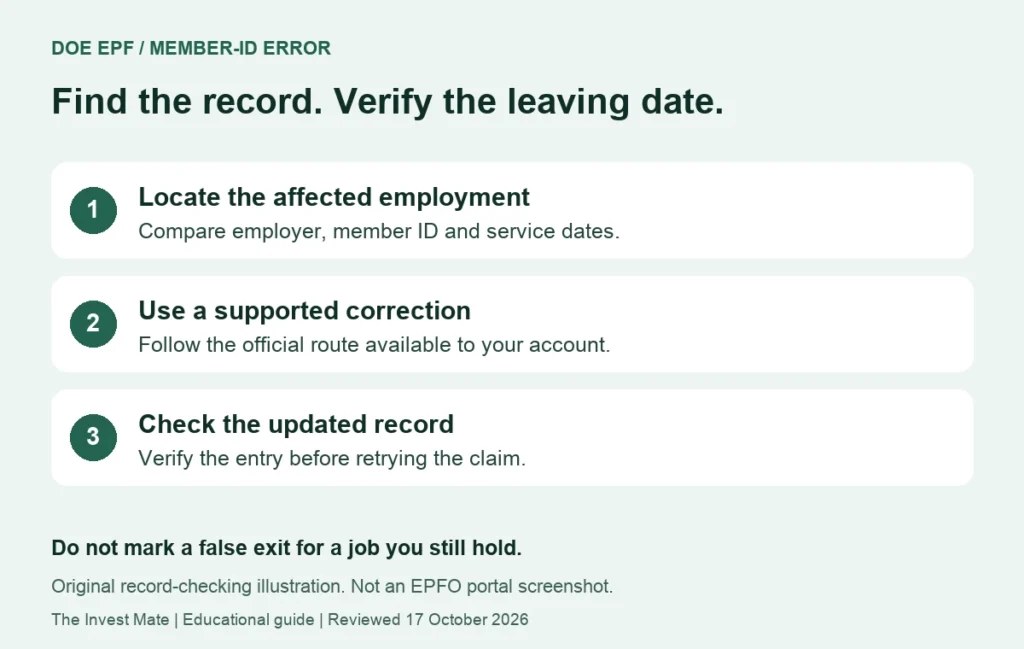
Match employer, member ID and actual employment period.
Use an available official route; clarify mismatches.
Check the updated entry before starting the claim again.
Example: the latest job is not the only record to inspect
This is an invented record-checking example, not an EPFO account screenshot or a statement of anyone’s eligibility. A person has three employment records:
| Employment | What the worksheet shows | Sensible next check |
|---|---|---|
| Employer A — previous job | No EPF exit entry shown | Compare leaving evidence and ask about the available correction route. |
| Employer B — previous job | Exit entry matches the retained record | Preserve it; no need to change a correct date. |
| Employer C — current job | Still employed | Do not mark an exit to bypass an error; ask EPFO to clarify any block involving this record. |
The point is to isolate the mismatch. Looking only at Employer B because it was the last completed job can miss Employer A. Conversely, “one or more member IDs” is not a direction to close every employment record. If an unfamiliar or duplicate-looking record appears, establish the facts with EPFO before taking a deletion or delinking action.
The date is visible now, but the same error remains
Record where the update is visible, when you submitted it and whether the claim screen still names a particular record. Check that you corrected the intended member ID rather than a different employment with a similar employer name. Do not assume that a refreshed page establishes that every related record has been reconciled.
If the block persists, use EPFiGMS: official grievance service to ask for the exact affected member ID, the field that is missing and the next correction step. Keep the registration number and review the reply before resubmitting the same explanation. A grievance is a request for resolution, not a guarantee that a claim becomes eligible.
A clear clarification message you can adapt
Subject: Claim blocked by DOE EPF/member-ID error
My claim screen displays: [exact error]. Please identify the affected employment/member ID and the specific EPF/EPS field requiring verification. My retained employment records show [brief factual summary]. I submitted [correction request, if any] on [date], and the current screen shows [status]. Please advise the appropriate correction route and any supporting evidence required. I do not want to enter an unsupported leaving date.
Fill private identifiers only inside the relevant official secure channel when requested. Do not post a UAN, Aadhaar number, bank details, password or OTP in a public comment or send them to a person promising an instant fix.
Different claim problem? Choose the right guide
If the claim was submitted and later rejected, use EPF claim rejected: checks before reapplying. If the status is already settled but payment has not arrived, use EPF claim settled but amount not credited. A claim-filing block, rejection and missing payment are separate stages.
Frequently asked questions
What is DOE in EPF?
It means date of exit in the employment record. The message here concerns the EPF exit field; do not assume an EPS field can be edited in the same way.
Should I mark an exit for my current job?
No false exit should be entered to clear an error. If you still work there and the claim is blocked, ask for the correct account-specific route.
Can I use today’s date if I do not know the leaving date?
Do not guess. Check employment evidence and clarify any conflict with the relevant employer or EPFO.
Is Mark Exit the same as correcting a wrong exit date?
Not necessarily. The current record and account permissions determine which workflow is available. Read the screen before proceeding.
Does correcting DOE guarantee withdrawal approval?
No. The claim still has its own eligibility, record and payment checks. This guide addresses the exit-record block only.
Why not just remove the old member ID?
A genuine employment record can contain relevant balance and service history. Investigate the record instead of treating deletion as a generic workaround.
Sources and review scope
Hindi explanation and linked profile-update guidance reviewed on 21 October 2026. The original record-checking guide was reviewed on 17 October. Earlier source dates are shown so a process announcement is not presented as a new October 2026 rule. Portal wording and the route available to an individual member can vary.
- EPFO Member Home: official portal entry
- PIB: simplified member-profile updates, 19 January 2025
- EPFiGMS: official grievance service
The examples, checklists and message templates are original educational illustrations. We have not accessed your EPFO account or tested an authenticated claim on your behalf. This page does not determine your benefit eligibility or promise an approval or payment date.